BirdBrain is part of the CreXo family of brands!
Learn MoreBirdBrain is part of the CreXo family of brands!
Learn MoreHands on programming kits give learners a practical way to turn code into movement, light, or sound. A student might connect a sensor, write a short script, then watch a small robot change direction. For global buyers, choosing a kit means evaluating more than its advertised features. Age range, coding environment, replacement parts, and classroom support all matter.
The World Economic Forum’s Future of Jobs Report 2025 says employers expect 39% of workers’ core skills to change by 2030. It also reports that 63% of surveyed employers see skills gaps as a barrier to business transformation. These figures do not measure programming kits directly. They do, however, underline why adaptable digital learning tools attract attention. No kit solves that challenge alone.
China-based suppliers offer options spanning beginner block coding, programmable boards, and robotics sets. Buyers should check whether instructions are clear, software works across intended devices, and spare motors or cables can be reordered. Ask for a sample. Test it with the learners who will actually use it. Request component lists, support terms, and documentation in the required language before placing a large order. A low unit price can look persuasive, but missing cables or unclear setup steps can quickly weaken its value. I would not assume every kit suits every curriculum; even a polished demo may hide setup friction. That deserves a closer look.
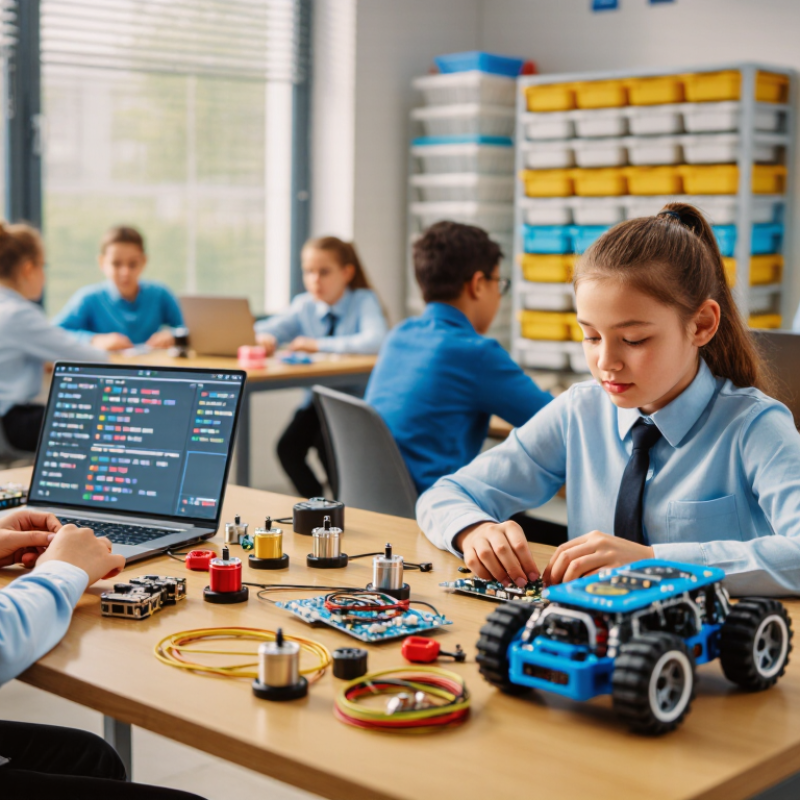
Hands-on programming kits pair simple hardware with code learners can test in real time. A typical set may include a small controller, LEDs, buttons, wires, and a light sensor. Learners write instructions, connect components, and watch the results. If an LED stays dark, they can check the wiring or revise the code. That visible feedback makes abstract ideas easier to explore.
Many kits begin with visual blocks, where learners snap commands together. Later, they can move to typed code and meet variables, loops, and conditions. A motor that runs while a button is pressed makes these ideas tangible. So does a sensor that changes an LED’s brightness. Still, a kit cannot teach by itself. Clear lessons, safe components, and time for trial and error matter. Some activities may feel repetitive, and that is worth noticing when choosing a kit.
Tips: Check the age guidance, language options, and included instructions before buying. Look for projects that build gradually, from blinking lights to sensor-based tasks. Confirm that replacement parts and compatible devices are easy to obtain in your region. Keep a small notebook: record each change and what happened. It is a simple habit, though learners may forget to use it at first.
China Best Hands On Programming Kits for Global Buyers?
Main Types of Programming Kits Made in China
Programming kits made in China commonly fall into four groups: block-coding sets, robotics kits, microcontroller kits, and app or game development kits. Block coding uses visual commands to teach sequences and loops. Robotics kits add motors, wheels, and sensors, so learners can test code on a moving model. Microcontroller sets introduce circuits, input-output logic, and simple components such as LEDs. App and game kits focus more on software than hardware. Each type suits a different age, skill level, and classroom setup.
The World Economic Forum’s Future of Jobs Report 2023 estimates that 44% of workers’ skills will be disrupted within five years. That makes adaptable digital skills relevant, though a kit alone cannot deliver them. For buyers, check whether lessons progress from basic tasks to open-ended projects. Also review component labeling, translated instructions, replacement-part availability, and device compatibility. A colorful box can hide confusing steps. I would not assume every kit’s stated age range matches the learner’s actual ability.
Tips: Ask for a sample lesson and a full component list before ordering. Check that wires fit securely and instructions show clear diagrams. Keep it tactile. A small project, such as making an LED blink, often reveals more than a long feature list.
| Kit Type | Typical Hardware | Common Programming Approach | Hands-On Learning Outcomes | Typical Users | Buyer Checks |
|---|---|---|---|---|---|
| Programmable Robot Car Kit | Chassis, geared motors, wheels, motor driver, controller board, and often line-tracking or distance sensors | Block-based coding for beginners; some models also support text-based programming | Motor control, sensor input, movement sequences, obstacle avoidance, and basic robotics | Schools, coding clubs, and beginner robotics learners | Check included sensors, assembly difficulty, battery requirements, replacement parts, and supported software platforms. |
| Microcontroller Starter Kit | Microcontroller board, breadboard, jumper wires, LEDs, buttons, resistors, and selected sensors or actuators | Text-based coding is common; some kits include a block-based learning option | Basic electronics, inputs and outputs, circuits, sensor readings, and small interactive projects | Older students, hobbyists, and introductory engineering courses | Confirm board specifications, operating voltage, interface cables, component quantities, and whether documentation is included. |
| Block-Coding Controller Kit | Compact programmable controller with buttons, lights, display, or built-in motion and environmental sensors | Visual, drag-and-drop blocks; compatibility with text-based coding varies by model | Sequencing, loops, conditionals, event handling, and simple sensor-based activities | Primary and lower-secondary education, workshops, and first-time coders | Review device compatibility, language availability, classroom setup needs, charging method, and offline-use options. |
| Robotic Arm Kit | Multi-joint arm structure, servo motors, controller, gripper, and sometimes a joystick or sensor module | Block-based or text-based control, depending on the controller and software | Joint movement, coordinate concepts, control sequences, and basic automation | Robotics labs, technical education, and intermediate learners | Check assembly instructions, servo count, payload limits where specified, power supply requirements, and spare-part availability. |
| IoT and Smart-Device Kit | Controller with wireless connectivity, sensors, indicator outputs, and sometimes relay or display modules | Block-based or text-based programming with wireless or network libraries | Sensor monitoring, data communication, connected-device prototypes, and introductory automation | Secondary and post-secondary education, makers, and prototype developers | Verify wireless standards, regional radio compliance, network setup requirements, security documentation, and included power accessories. |
| Programmable Sensor and Data-Logging Kit | Controller, environmental or motion sensors, and a display or data-storage interface where included | Block-based or text-based coding; some configurations support data logging and visualization | Collecting and comparing measurements, interpreting sensor data, and building simple monitoring projects | STEM classes, science projects, and introductory electronics learners | Ask which sensors are supplied, their stated measurement ranges, calibration guidance, data-export format, and software requirements. |
| Camera or Vision Robotics Kit | Controller or computing module, camera, chassis or mounting hardware, and optional motors or sensors | Usually text-based programming; visual tools may be available for selected learning activities | Image capture, basic visual recognition demonstrations, robot control, and introductory computer-vision concepts | Advanced school programs, university projects, and experienced makers | Check processing requirements, camera resolution, software support, privacy considerations, and whether computing hardware is included. |
Configurations, software support, age suitability, and included components vary by product. Buyers should confirm specifications, safety documentation, and applicable market requirements with the supplier before ordering.
When comparing hands-on programming kits, inspect the hardware before counting the projects. Check whether boards, cables, and sensors are replaceable, clearly labeled, and easy to connect without tools. A temperature sensor should produce a readable value, not just a blinking light. Look for stable power options, protected connectors, and parts that survive repeated classroom use. Small details matter. For global buyers, printed diagrams, unit settings, and downloadable lessons should be easy to localize. Offline activities are useful where internet access is unreliable.
Learning features deserve equal scrutiny. A useful kit moves from simple sequences to loops, conditions, and sensor-based projects, with explanations that help learners debug their own mistakes. The World Economic Forum’s Future of Jobs Report 2025 says employers expect 39% of workers’ core skills to change by 2030, while technological literacy is among the fastest-growing skills. This is workforce context, not proof that any kit improves outcomes. I would not treat a high component count as evidence of deeper learning; it can become clutter. Ask suppliers for sample lesson plans, age guidance, replacement-part availability, and evidence from classroom trials. Some kits still assume a confident adult is nearby. That limitation deserves a direct question.
Global buyers should judge a programming kit by repeatable tasks, not polished demonstrations. Check connector types, required voltage, supported operating systems, and whether setup works without a reliable internet connection. A practical bench check is simple: connect the controller, load a sample program, unplug and reconnect it, then repeat the task on another computer. Small compatibility failures matter. Confirm that instructions, interface language, replacement parts, and firmware updates suit the intended classroom and local supply chain.
Learning value also depends on whether a kit can grow with users’ skills. The World Economic Forum’s Future of Jobs Report 2023 estimates that 44% of workers’ skills will be disrupted within five years. That makes reusable components and adjustable project difficulty worth checking, rather than buying a kit limited to one demonstration. For connected products, review account requirements and data handling. UNESCO’s 2023 Global Education Monitoring Report found that 89% of surveyed education technology products could survey children. That figure is a reminder to ask what information a kit collects. I still treat a neat demo as weak evidence; real classroom performance can be messier. Ask suppliers for test procedures, compatibility lists, and clear failure-support terms before placing a bulk order.
Nominal maximum data rates of common connectivity standards (Mbps). These standards provide a comparison baseline; actual kit support and performance depend on the hardware and implementation.
Before purchasing, confirm that the kit explicitly supports the required interface, operating systems, programming tools, and regional power requirements. Standard maximum rates are theoretical, not guaranteed real-world performance.
For global buyers, a programming kit is only as dependable as its export paperwork and after-sales support. Ask suppliers for a commercial invoice, packing list, country-of-origin details, and clear product descriptions. Confirm the correct customs classification with a qualified broker; vague descriptions can delay a shipment. If a kit contains batteries, request the relevant transport documents before dispatch. Small details matter.
Safety needs evidence, not broad assurances. Request test reports that match the destination market, and check age guidance, cable quality, small components, and packaging. The European Commission’s 2023 Safety Gate report recorded 3,412 product alerts across categories, highlighting why traceable checks matter. Requirements vary by market. UNESCO’s 2023 Global Education Monitoring Report found that only 16% of countries explicitly guarantee education data privacy by law. For connected kits, ask what student data the software collects, where it is stored, and how accounts can be deleted. A checklist can still miss issues; review the actual kit and its documentation.
Support also affects classroom use. Buyers should confirm setup instructions, firmware update access, replacement-part availability, and response times across time zones. A one-page guide with labeled ports can prevent a long email exchange. Ask for sample instructions before ordering. They may reveal unclear steps.
To provide the best experiences, we use cookies to store and/or access device information. Consenting to these technologies will allow us to process data such as browsing behavior or unique IDs on this site. Not consenting or withdrawing consent, may adversely affect certain features and functions.