
Register to receive free access to all teacher materials.

l Projects


Activity
BattleBots
Battle with another Finch Robot to see who can score the most points in three minutes! Create your own custom attachments and programs for offense and defense.
INTERMEDIATE: Outputs Only
Required lessons: Moving and Turning, Controlling Wheels
Begin with the Finch Jousting activity. Once your students have created their engineering design attachments and successfully learned to knock the ball off of their cup, it’s time to take it up a notch by adding some friendly competition!
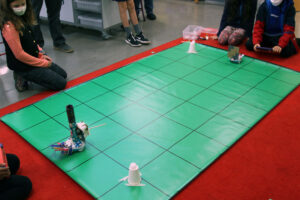
First, create a battlefield with a goal area and a home base for each team. It is helpful to mark these using masking take or wet erase marker. We suggested marking these on a robot mat that you can pull out for each class meeting, if possible. In the example below, each robot is in their marked Home Base, and the cups are taped down in their Goal areas:
Next, explain your team’s goals. Here are example goals, which you can edit to suit your needs:
- Score the most points by the end of the 3:00 round to move up in the tournament.
- Score a point by knocking your opponent’s ball off of their cup.
- After you score a point, you must reset your robot back to home base and reset the ball. (Other team does not need to reset.)
- This game is all about strategy! Consider both offense and defense.
When your group is ready, go over the game rules. Here are example rules, which you can edit to suit your needs:
- Each team will have one iPad, one robot, and one goal (one cup, one ball).
- You may touch your robot with your hands at any time. Every time it is touched, it must go back to home base and start again from there.
- You may create as many attachments for your robot as you like. You may only switch out attachments while your robot is in home base.
- Your robot must stay on the mat. If both wheels are off of the mat, you must reset to home base.
If you’d like, you may create programming rules. Here are example programming rules, which you can edit to suit your needs:
- You may create as many programs for your robot as you would like.
All programs need to be created and saved before the match begins. - Your code must be fixed or autonomous.
- You can only begin your program when you are in home base.
Split students into groups of 2 or 3, and have them plan a design for their robot and give it a name.
Give your students time to build their engineering design attachments, create their programs, and practice. This can include scrimmages on the battlefield. Let students know how long each round will be: we suggest 3 minutes. Let students practice with a timer.
Set a date for the competition, or tournament. Tip: If you run your competition with a double elimination bracket, each team gets to play at least twice. You can create your tournament bracket yourself or use an online tool to create one for you using your team names.
ADVANCED: Going Further with Sensors
Required lessons: Sensor Overview, Conditional Statements
Add inputs to your BattleBots offensive and defensive programs to make your battle more challenging. Students can incorporate distance sensors to avoid obstacles or collisions, or sound sensors to call their robots to a certain area without breaking any rules. Get creative and see what your students can do!