Seeing Hummingbird Blocks when you have paired a Finch Robot using bluetooth is an indication that the micro:bit is not properly connected to the Finch; therefore, the micro:bit assumes it’s paired to a Hummingbird Controller. This can happen when the micro:bit is not fully inserted into the Finch tail or is slightly dislodged when set in place.
There are two places you can check to see if this is happening once you pair your robot:
- When you look at the top bar, after pairing the robot, you should see a Finch icon on the left side. If you see a Hummingbird controller icon, the micro:bit is not recognizing the Finch.

- When you look at your micro:bit, you should see ten characters flashing. After the first three letters, you should see #FN – this indicates a successful connection to the Finch. If you see #BB or #MB, the micro:bit is not recognizing the Finch. Double check to make sure your micro:bit is inserted correctly.
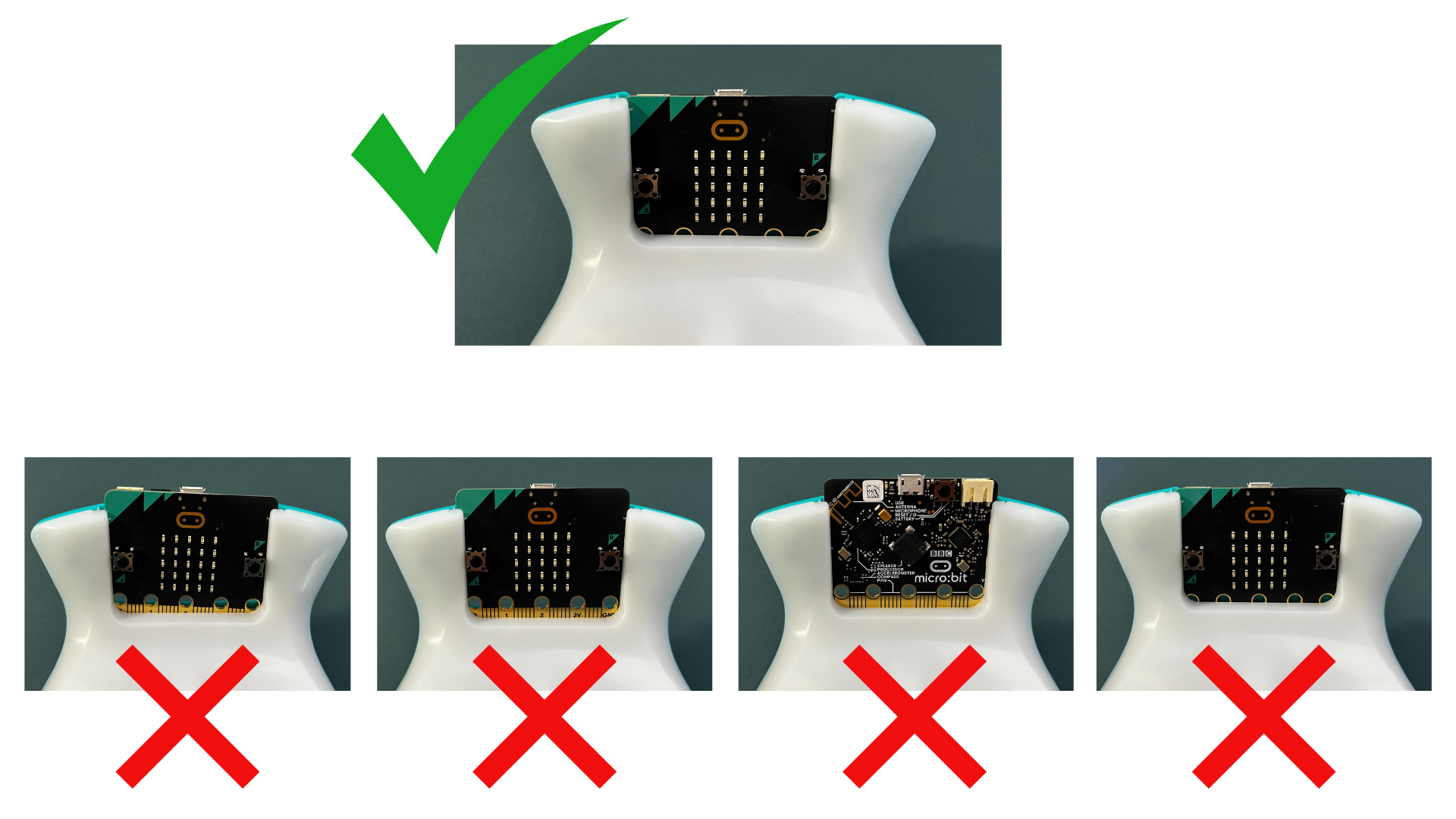
You can fix this by turning the Finch off, removing and reinserting the micro:bit, and then turning the Finch back on. The page should automatically disconnect when you turn the Finch off; however, you may need to refresh the webpage or open it in a new tab before pairing the Finch again.
Was this article helpful?
YesNo